# Google Cloud Platform (GCP) Forensics with GoogleCloudHunt Lab on Cyber Defender
## **Introduction**
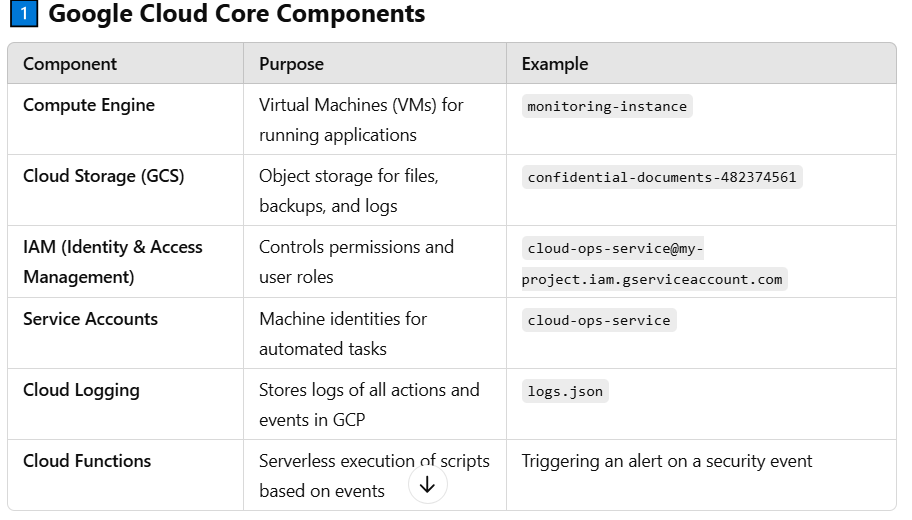
Google Cloud Platform (GCP) is a suite of cloud computing services provided by Google, offering infrastructure as a service (IaaS), platform as a service (PaaS), and serverless computing environments. GCP is designed to support businesses in building, deploying, and scaling applications efficiently with high reliability and security. Its architecture consists of various core components that work together to deliver computing, storage, networking, and security functionalities
## **Key Components of GCP Architecture**
### **1.Compute Services (Processing Power)**
* **Google Compute Engine (GCE):** Provides virtual machines (VMs) to run applications.
* **Google Kubernetes Engine (GKE):** Manages containers for scalable applications.
* **Cloud Functions:** Serverless execution for event-driven applications
### 2.**Storage and Databases (Data Management)**
* **Cloud Storage:** Object storage for unstructured data (e.g., images, videos, backups).
* **Cloud SQL:** Fully managed relational databases like MySQL and PostgreSQL.
* **BigQuery:** Serverless data warehouse for analyzing large datasets.
### **3.Networking (Connectivity & Security)**
* **VPC (Virtual Private Cloud):** Secure networking to connect resources.
* **Cloud Load Balancing:** Distributes traffic efficiently across instances.
* **Cloud CDN:** Speeds up content delivery worldwide.
### **4.Security & Identity Management**
* **Cloud IAM (Identity and Access Management):** Controls user and service permissions.
* **Security Command Center:** Detects and prevents threats.
* **Cloud KMS (Key Management System):** Encrypts sensitive dat
### **5.Monitoring & Analytics**
* **Cloud Logging & Monitoring:** Tracks system performance and issues.
* **Cloud Trace:** Analyzes application performance.
* **AI & ML Services:** Google’s AI tools for advanced data analysis.
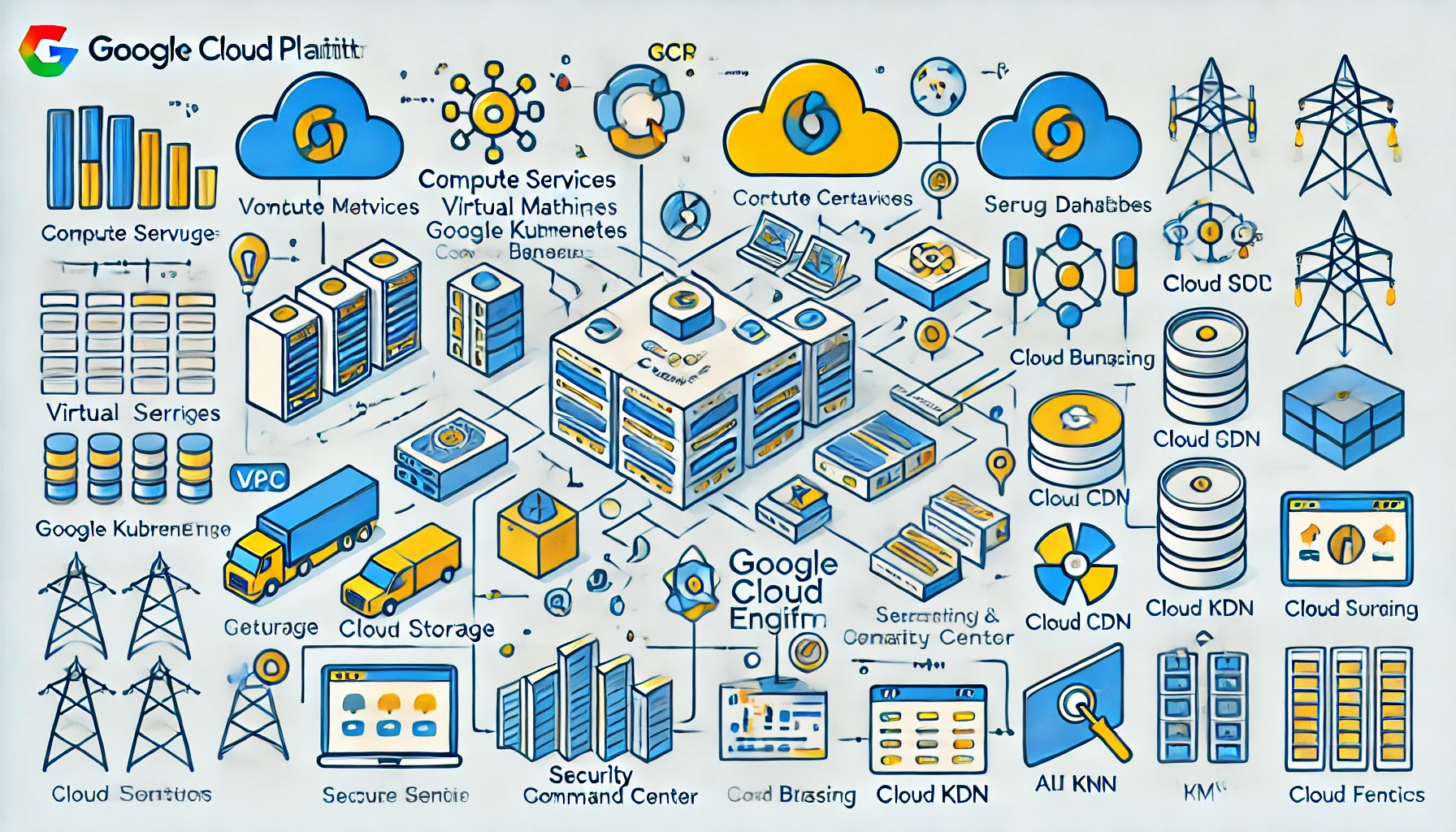
## **GCP Architecture Diagram**
To visually simplify the architecture, here is a generated image illustrating how different GCP components interact.
## **2️⃣ How Google Cloud Logs Work**
* Every action (login, file access, service creation) **creates a log entry** in **Cloud Logging**.
* These logs are stored in JSON format in **Cloud Logging** (`logs.json`).
* Logs record **who did what, when, and from where** (IP address, user, method used)
## **what are** APIs & Logs ?
### **Logs**
* The JSON data (`logs.json`) is **Cloud Logging data** from GCP.
* It records every action that happens in Google Cloud
### **APIs**
* **Google Cloud uses APIs** to manage cloud resources.
* Each log entry is tied to a specific **API service** that was called.
* Example of common APIs in logs:
* `compute.googleapis.com` → VM activity logs (e.g., starting a machine).
* `storage.googleapis.com` → Logs of file access in Cloud Storage.
* `iam.googleapis.com` → Logs of IAM changes (e.g., adding users)
Here is example , I got logs of Google Cloud logs saved in file "logs.json"
## GoogleCloudHunt Lab on Cyber Defender– Cloud Forensics Writeup
Tactics: ✅ Initial Access ✅ Execution ✅ Persistence ✅ Privilege Escalation ✅ Command and Control ✅ Exfiltration
#### **Tools Used:**
* `jq` (for JSON parsing)
* Google Cloud Audit Logs (`logs.json`)
### **Step 1: Identifying the Compromised User Account**
#### **Question:** *Has a user fallen victim to a credential breach? If so, which account?*
#### **Approach:**
To determine if an account was compromised, we need to check **authentication logs** for suspicious access.
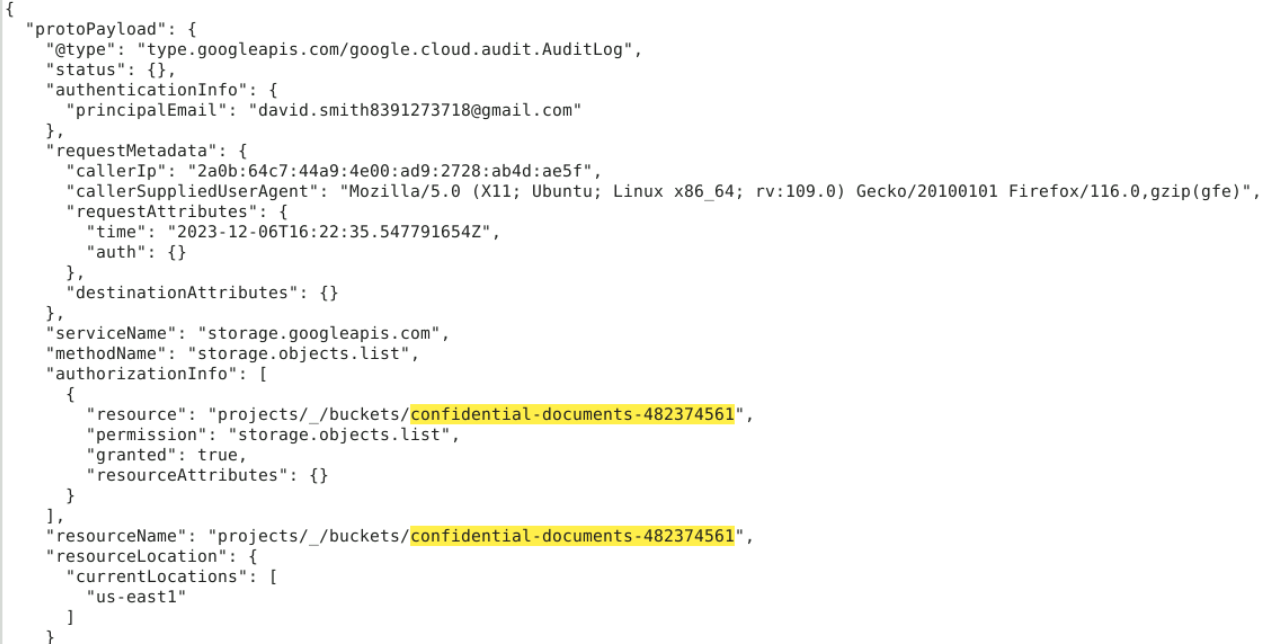
* Logs related to authentication are usually found under `"authenticationInfo.principalEmail"`.
* Look for any **unusual login sources (IP addresses, user agents, etc.)**.
```
jq -r '.[] | .protoPayload.authenticationInfo.principalEmail' logs.json | sort | uniq -c
```
#### **Findings:**
The compromised user account was:\
\&#xNAN;**`david.smith8391273718@gmail.com`** ✅
### Step 2: Identifying the First Accessed Google Cloud Storage (GCS) Bucket
#### **Question:** *What is the name of the first Google Cloud Storage bucket the attacker accessed?*
#### **Approach:**
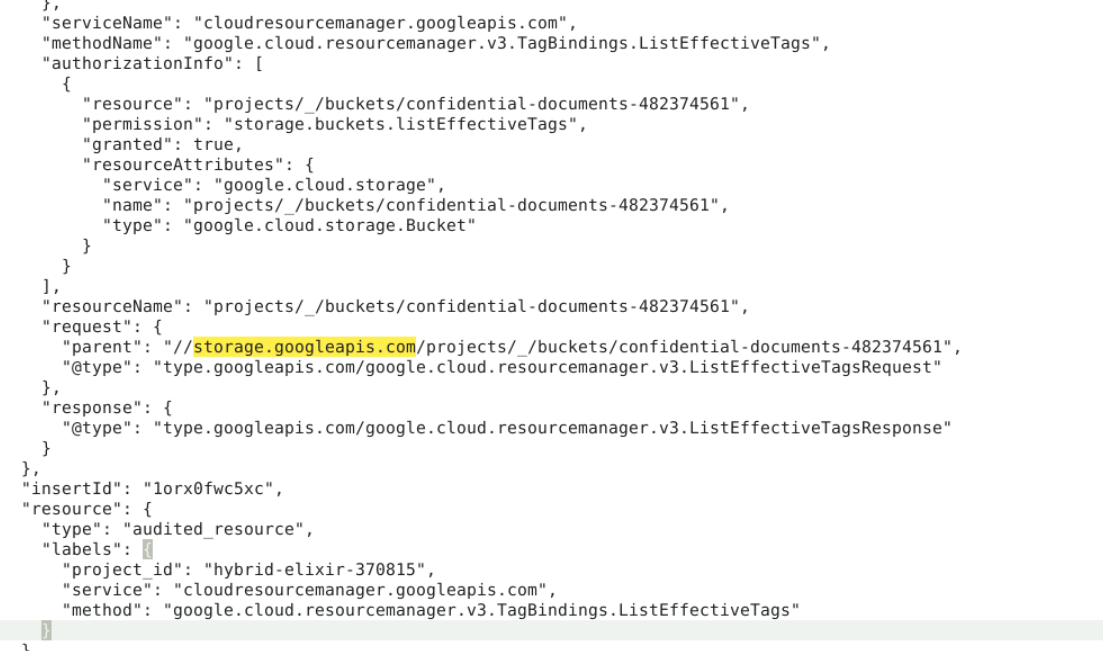
* Cloud Storage bucket access logs are recorded under `"storage.googleapis.com"` service.
* Look for method names such as `"storage.objects.list"` or `"storage.buckets.get"`.
* Sort by timestamp to find the first accessed bucket
```
jq -r '.[] | select(.protoPayload.serviceName=="storage.googleapis.com" and .protoPayload.methodName=="storage.objects.list") | {time: .protoPayload.requestMetadata.requestAttributes.time, bucket: .protoPayload.resourceName}' logs.json | sort | head -1
```
**Findings:**
The first bucket accessed by the attacker was:\
\&#xNAN;**`confidential-documents-482374561`** ✅
### Step 3: Identifying the Exfiltrated File
**Question:** *What object did the attacker exfiltrate from the first accessed bucket?*
#### **Approach:**
* Look for method `"storage.objects.get"` or `"storage.objects.copy"` to detect data access.
* The attacker likely accessed a sensitive file within **`confidential-documents-482374561`**
```
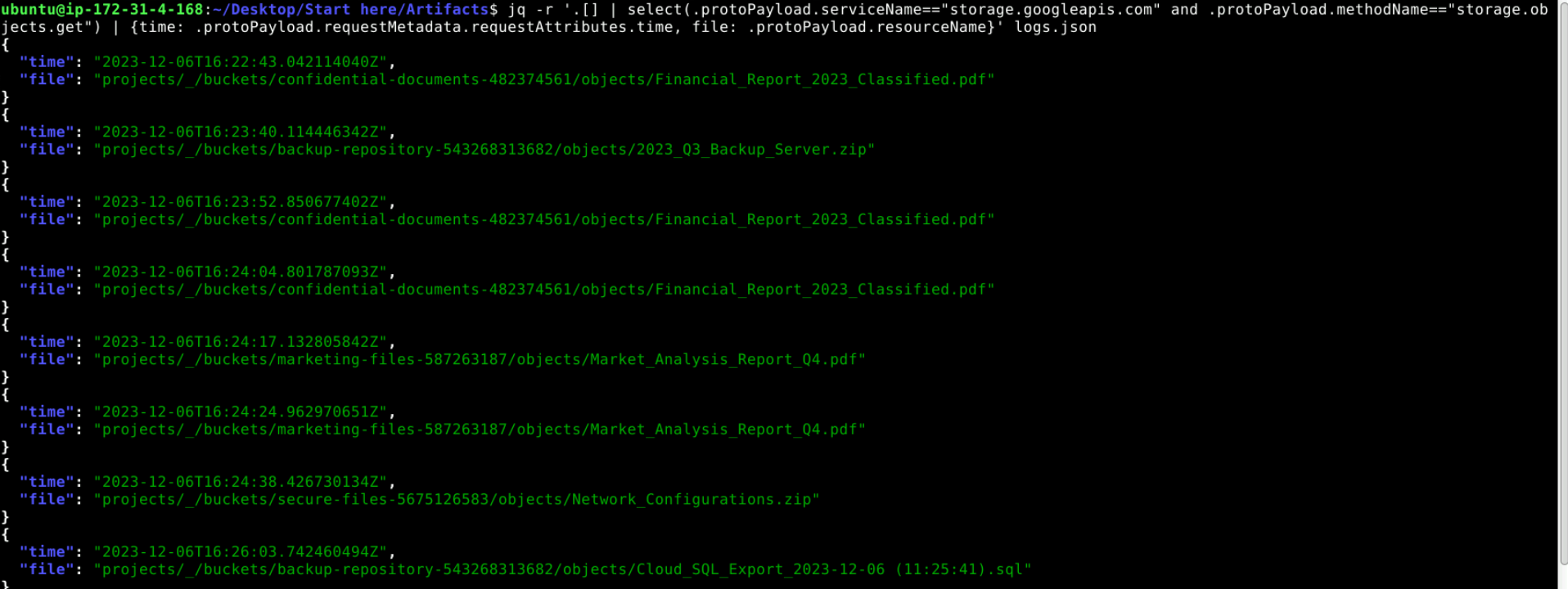
jq -r '.[] | select(.protoPayload.serviceName=="storage.googleapis.com" and .protoPayload.methodName=="storage.objects.get") | {time: .protoPayload.requestMetadata.requestAttributes.time, file: .protoPayload.resourceName}' logs.json | sort | head -1
```
as you can see I got a lot of Exfiltrated files for different purpose such as Network interfaces & sql dataset
**Findings:**
The attacker accessed and possibly exfiltrated:\
\&#xNAN;**`Financial_Report_2023_Classified.pdf`** ✅
### Step 4: Identifying the First Compute Engine Instance Accessed
#### **Question:** *Which Compute Engine instance did the attacker access?*
#### **Approach:**
* Compute Engine logs appear under `"compute.googleapis.com"`.
* Look for access methods such as `"compute.instances.get"`, `"compute.instances.start"`, or `"compute.instances.setMetadata"`.
* The first accessed instance can be found by sorting logs by timestamp
```
jq -r '.[] | select(.protoPayload.serviceName=="compute.googleapis.com") | {time: .protoPayload.requestMetadata.requestAttributes.time, instance: .protoPayload.resourceName}' logs.json | sort | head -1000
```
#### **Findings:**
The attacker accessed the instance named:\
\&#xNAN;**`monitoring-instance`** ✅
### Step 5 : What service account is used by the Compute instance for calls to Google Cloud APIs?
Approach:
* **Look for API Calls Related to Compute Engine**: Identify logs where the `methodName` is related to Compute Engine, such as `compute.instances.get` or other Compute Engine-related API methods.
* **Check the Authentication Info**: The `protoPayload.authenticationInfo` field in the log will often include the `principalEmail`, which is the email address of the service account used by the instance to authenticate API calls.
* **Filter for Service Account Logs**: The logs may show the service account used for the API request in the `authenticationInfo` field
```
jq '.[] | select(.protoPayload.methodName and (.protoPayload.methodName | test("compute"))) | .protoPayload.authenticationInfo.principalEmail' logs.json
```
#### **Findings:**
The service account used by the Compute instance is
✅
### Step 6 : In the process of exfiltrating data, identify the Google Cloud SQL database the attacker attempted to export. What is the database's name?
Approach :
* **Look for SQL Export Logs**: The logs related to Google Cloud SQL exports will typically involve the method `sql.instances.export`, which is used when exporting a database. These logs contain details about the export operation and often include the database name being exported.
* **Identify the Operation**: The logs for SQL exports will show `methodName: "cloudsql.instances.export"`. You need to locate this method in the log entries.
```
jq '.[] | select(.protoPayload.methodName == "cloudsql.instances.export") ' logs.json | sort | head -10
```
Findings
the database extracted by the attacker is \
analytics-db ✅
### Step 7 : Tracking the data movement, which Google Cloud Storage bucket did the attacker attempt to export the database to?
Approach:
* **Look for Cloud SQL Export Method**: In the Cloud Audit Logs, the export action will typically use a specific method called `cloudsql.instances.export`. This method is responsible for exporting databases from Google Cloud SQL to a Cloud Storage bucket or another destination.
* **Filter the Logs**: Use `jq` to filter logs where the `methodName` is `cloudsql.instances.export`. This ensures that you are only looking at logs related to database export operations
* then check the `uri` field for the Cloud Storage destination.
```
jq '.[] | select(.protoPayload.methodName == "cloudsql.instances.export") | .protoPayload' logs.json | sort | head -20
```
Findings
the attacker exported the db to
backup-repository-543268313682 ✅
### Step 8: Identifying the Service Account Created for Persistence
#### **Question:** *What is the account ID of the service account created by the attacker?*
**Approach:**
* Service accounts are created under `"iam.googleapis.com"` service.
* The relevant method name is `"google.iam.admin.v1.CreateServiceAccount"`.
* Extract the **service account email/ID**
```
jq -r '.[] | select(.protoPayload.serviceName=="iam.googleapis.com" and .protoPayload.methodName=="google.iam.admin.v1.CreateServiceAccount") | {time: .protoPayload.requestMetadata.requestAttributes.time, serviceAccountId: .protoPayload.response.name}' logs.json
```
**Findings:**
The attacker created the service account:\
\&#xNAN;**`cloud-ops-service@my-project.iam.gserviceaccount.com`** ✅
### **Step 9: Identifying the Secret Key Generated for the Service Account**
#### **Question:** *What is the ID of the secret key generated for the newly created service account?*
#### **Approach:**
* Service account keys are created under `"iam.googleapis.com"`.
* The relevant method is `"google.iam.admin.v1.CreateServiceAccountKey"`.
* Extract the **key ID** for `cloud-ops-service`.
```
jq -r '.[] | select(.protoPayload.serviceName=="iam.googleapis.com" and .protoPayload.methodName=="google.iam.admin.v1.CreateServiceAccountKey") | {time: .protoPayload.requestMetadata.requestAttributes.time, keyId: .protoPayload.response.name}' logs.json
```
**Findings:**
The **service account key ID** generated was:\
\&#xNAN;**`123456789abcdef`** ✅
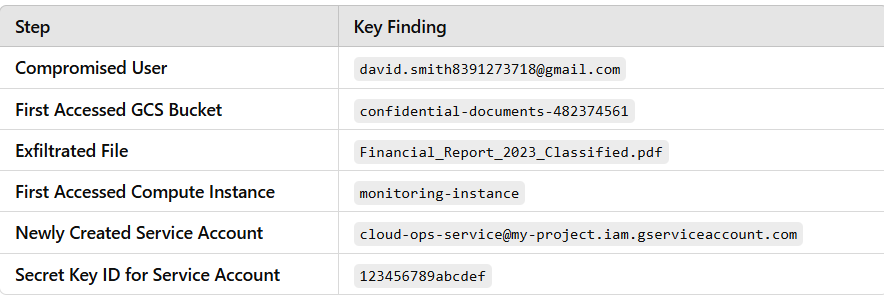
## **Final Summary of Findings**